
 REFERENCE LIBRARY


 Getting to know the Data Dictionaries

Now we have set up our Data Dictionaries, including masks, validations and data entry behavior, and know how to apply them in an application, we should look more closely at how data is found, updated and deleted through the Data Dictionary. In this lesson we’ll look into the Find action, the next lesson will be about update, save and delete.
If you are using Studio wizards to create select and zoom web views, a lot is generated by the Studio, and quickly you can run the application and see that things just magically work. Likewise, if you look at the sources of the WebOrderMobile example application, it may seem that things just magically work. Where is the actual code doing the database finds, saves and deletes?
Well, it’s not magic; the logic is hidden in the webview in combination with the Data Dictionary. At some point in the webview there will be a find statement, which could look something like this.

Often you can just rely on the components, like webviews, dialogs and lookups, with their DEO’s like weblists, webforms and webgrids in it. And you tweak them by setting properties on them.
But there are situations where you want more customized functionality or complexity. Or when you create business processes or reports, for example.
Find via DD
Then you’ll have to program the handling of data yourself. And that is OK. And it is good to get used to doing that via the Data Dictionaries.
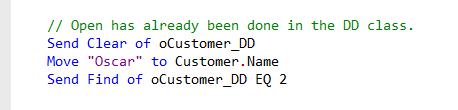
It is true that you can just say Find Gt Customer by Index 2. But this bypasses the Data Dictionaries. It is better to find through them. So the code would look something like this.
Subject: Open Table
Before a find can be executed, the table in which to find a row needs to be opened. A table is opened via the Open command.
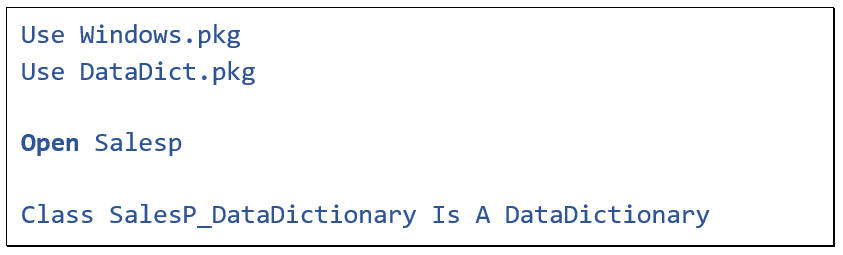
The Open statement is automatically inserted in the top of the Data Dictionary class file when the Data Dictionary class is created. And it has been created upon creating the table. It may be true that in this way multiple Open statements of the same table can be present in an application, usually there is only one Open statement in an application, but tables can be closed and re-opened at runtime. And the virtual machine ignores a second, or more, instruction to open a table that is already opened.
The Open command – if successful – creates a global buffer to hold one row of the table in memory.
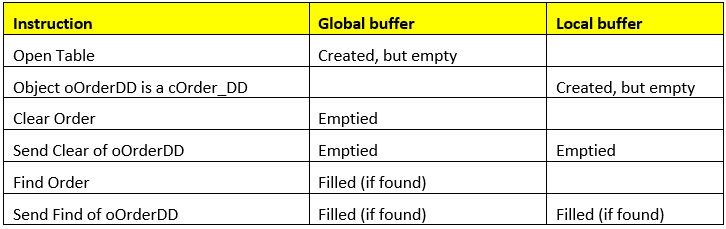
At that point, the local buffer does not exist yet. It is created upon creating the DDO and is empty. Only upon doing a find, the DDO buffer will be filled.
Now, what happens when doing a find? A find operation continues where the last find ended. But if the find should start at a different location, for example the first row or a particular row, the table buffer needs to be prepared.
Clear
The first step for that is doing a clear. The Clear message resets the DDO local buffer and the global table buffer to its null state. This means that ASCII columns will be blank and Numeric columns will be zero.

The clear instruction is executed under water by the Data Dictionary framework, but can also be done in the code, for example in a report or a business process. A clear instruction propagates upin the DDOstructure. Suppose you have a DDO structure with Customer and its child table OrderHeader.
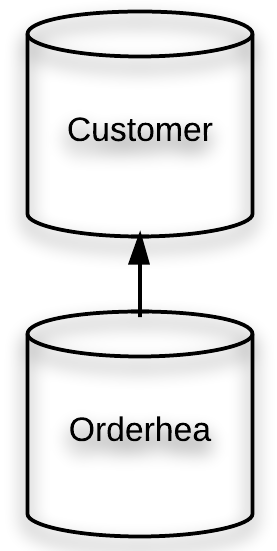
Then a clear sent to the OrderHeader DDO results in clearing the buffers of both Customer and OrderHeader. By the way, if you do not want Customer to be cleared when you clear OrderHeader, then you could set Constrain_File in the OrderHeader DDO.

A Send Clear of Customer only clears Customer, because normally the Clear does not propagate down.
Here is another DDO structure, with a relational constraint defined between OrderDetail and OrderHeader. The clear operation stops when a relational constraint is defined and used.
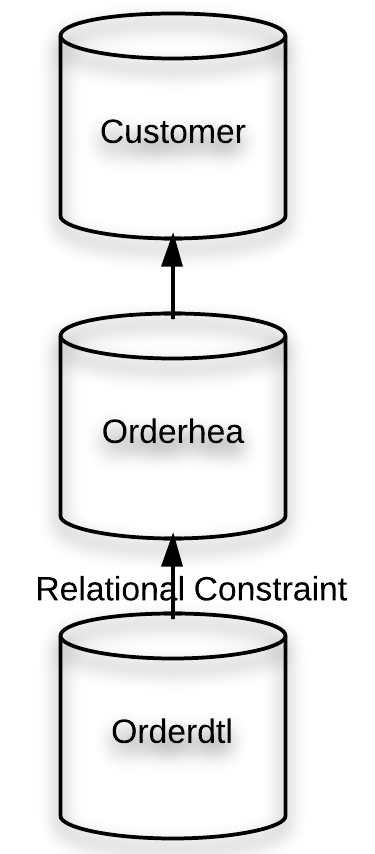
So now the buffer for the tables OrderHeader and Customer will not be cleared if the Clear message is sent to the OrderDetail DDO. However, in the case of a relational constraint the clear also propagates down. Which means that child tables are cleared together with the parent tables. So in this case, when the Clear message is sent to the OrderHeader DDO, the buffers of all three are cleared.
If you know you want to clear all tables of the DDO structure, then you could send a Clear_All message to the main DDO:

Find record
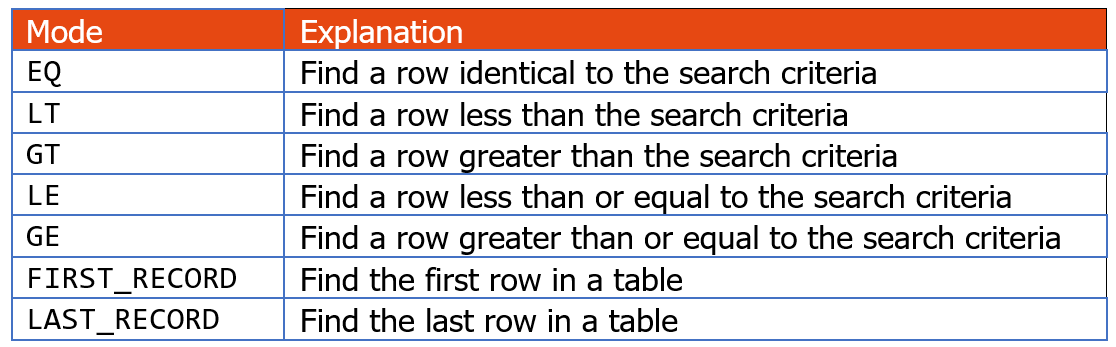
Now the clear has been done, we can do the Find. If you want to find the first record in the table, then send the message Find to the DDOwith the search direction GT (greater than) plus the index that you want to use. Finding the last record can be done with LT as search direction.
This table lists the possible find modes:
In this code snippet the first record in the Customer table according to index number 2 will be found.
 An index is used to quickly find a particular row in a table. Finding, in DataFlex, always uses an index.
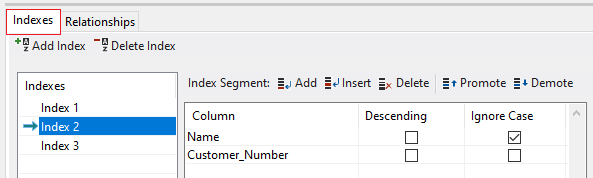
You can set indexes in the table editor, and they must be unique. In this example, index 2 is composed of two columns. It is indexed - and sorted - on the Name, but the Customer_Number is added to the index to make it unique. This is called a multi-segment index. By the way, be aware that with alphanumeric columns, the collating sequence is of importance.
Okay, so we did a clear and then a find. But instead of that code, the same could be accomplished by just doing a find using the FIRST_RECORD mode. FIRST_RECORD always finds the first record and GT only when the buffer is cleared. The same is true for searching backwards, so LAST_RECORD and LT.

To find a particular row using an index means that I have to seed the global buffer with a value that leads to the row, like in this example.
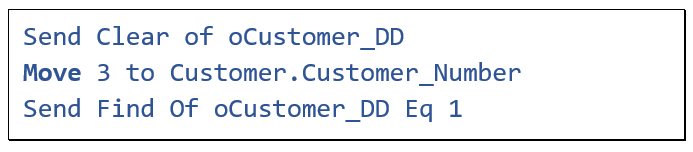
I know this sounds a bit confusing, but yes, you must seed the global buffer, not the local DDO-buffer, as I also mentioned in the previous lesson. This allows you to perform a find without changing the current data in your DDO. In the example it finds the Customer where Customer_number equals 1. It uses index 1, which only has the unique Customer_Number in it. Now suppose I want to find the customer with the name “Johnson”.

Then I use index 2 because I want to find by name. And I use Ge, which means greater-or-equal, because the index is a multi-segment index. EQ would not work because the value of the second segment is not given. So in this example it will find a row with the specified name in combination with a customer number larger than 0.
If you are using a multi-segment index, attention needs to go to the segments of the index and to the find mode. For example, what would happen if you would do the following.
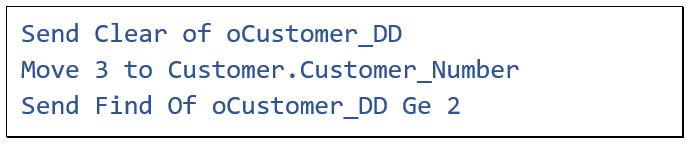
You might think you are trying to find the customer with Customer_number three, but you are using index 2, and the name is not supplied……. It will find… the first row with a name greater than blank, because it first looks at the first segment of the index. So the customer you find is most likely not the customer with Customer_Number 3.
Found / HasRecord
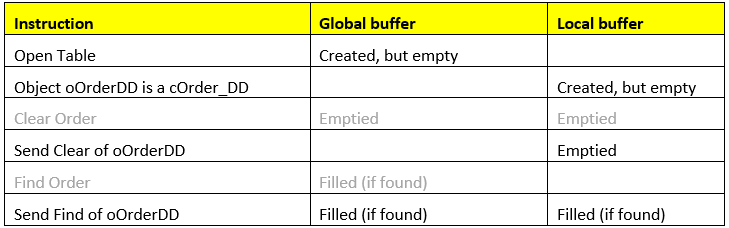
After a successful find, the row data will be loaded in the global buffer. If the find was performed via a Data Dictionary the data is copied to the local DDO buffer. Also, the Found indicator will be set and it should be used to test whether the Find was successful or not.
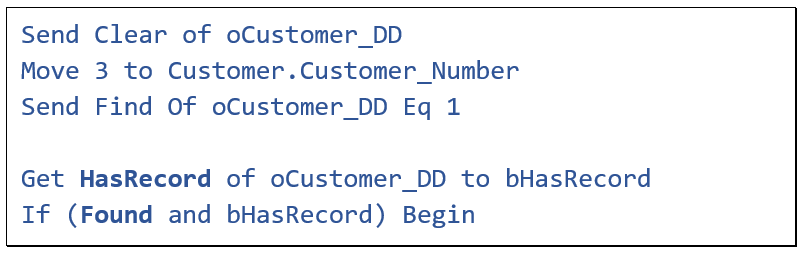
In addition, the Data Dictionary class publishes a function called HasRecord. This function tests if there is a record in the local DDO buffer and it returns true if the DDO buffer is not empty. This is not exactly the same as what the Found indicator does.
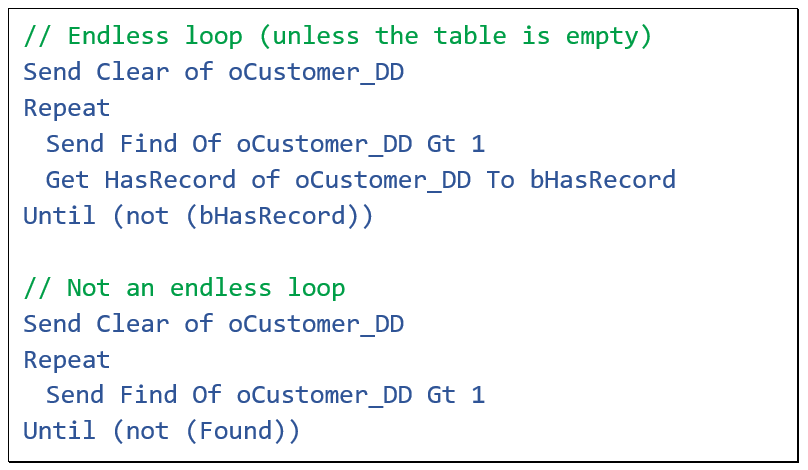
For example; if the last row of a table is in memory and the code requests for the next row, the Found indicator will be false as there is no next row, but the current row in the DDO buffer remains the same. This means that in this code example, the first loop results in an endless loop, while the second does not.
RowID
The DDO stores the RowID of a found row in a special property, which is readonly. The value can be retrieved using the CurrentRowId function call.
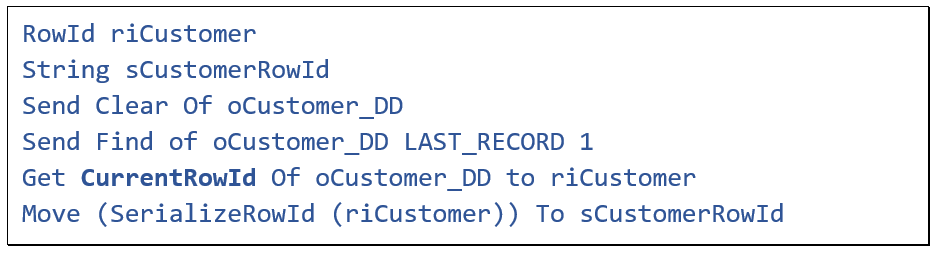
A RowId variable is a special type of variable which cannot be converted to a string or another datatype, but it can be serialized to get a string value if you want to display it.
A rowID can be handy to directly find a specific row. You can do this by calling the FindByRowId function. This will put the row data in the local DDO buffer.

Read messages
Sometimes it may be needed to inspect records of a table while already holding a particular record of that table in the local DDO buffer and you don’t want to disturb the contents of that current record. Then you can use a couple of Data Dictionary messages that support finding rows without updating the DDO local buffer. They allow you to take advantage of a DDO’s constraints, without having to actually update your DDO and its attached DEOs.
These messages are referred to as “Read” messages to distinguish them from the more normal “Find” messages which do update the DDOs and attached DEOs. Here is a list of read messages.
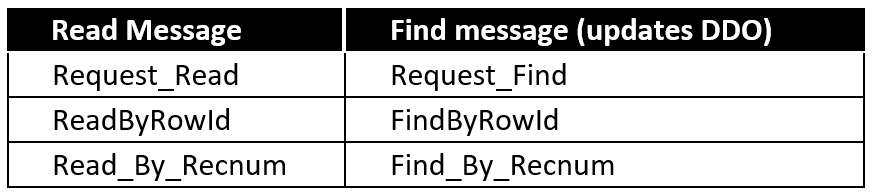
While they do not update the local DDO buffer, they do update the global buffer, which is where you can inspect the value.
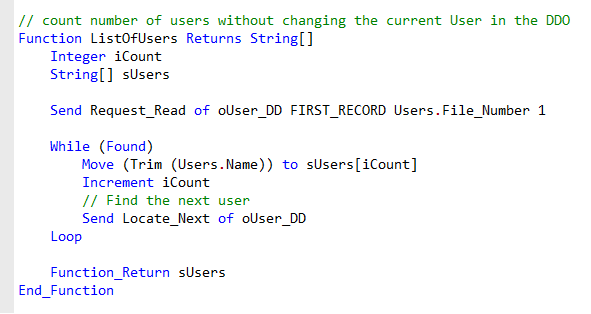
In this code example, this function gets a list of all users in the table, while keeping the same current user in the DDO buffer. As you can see, it uses the global file buffer to create an array of the user names. In the example there is also a call to the Locate_Next method. This finds the next logical record using the find mode, table, and index that were specified in a prior Find statement.
Finding child records
In a previous lesson we saw that a relational constraint limits the rows that can be found in a child table to those rows that belong to the current parent row. This makes it easy to write a routine that finds all child records.
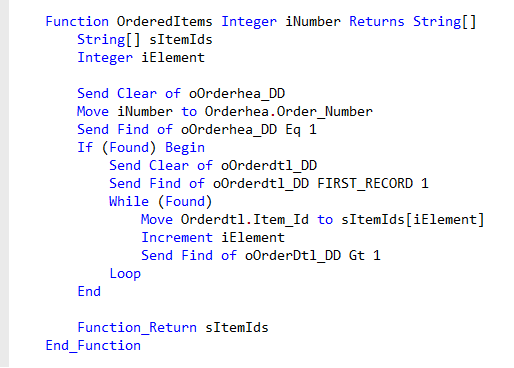
Here is a code example that first finds an Order Header record and then iterates through all Order Detail lines that belong to that Order Header. The function then returns an array of item_ID values.
Find events
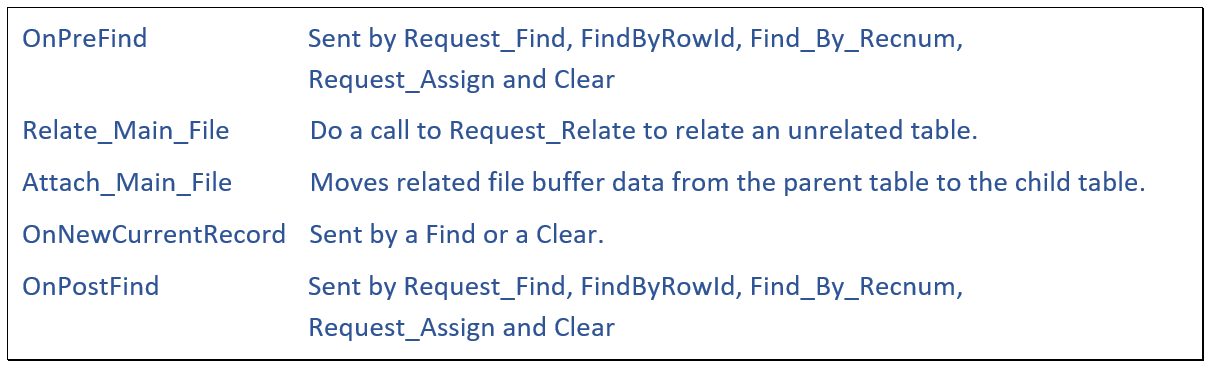
During the find process the events OnPreFind, Relate_Main_File, Attach_Main_File, OnNewCurrentRecord and OnPostFind are triggered. In the code they are procedures. Let’s have a look at them.
OnPreFind
The OnPreFind event is triggered at the start of a find process, and only for the DDO that receives the initial find request. It is a kind of central place where five Find operations all go to before doing the actual Find. They are Request_Find, FindByRowId, Find_By_Recnum, Request_Assign and Clear. The event comes with one argument, which indicates from which Find operation it came.
Relate_Main_File
The Relate_Main_File event, which by default does nothing, can be used to find rows in tables which are unrelatedbut should operate as if they are related. Let me explain it with an example.
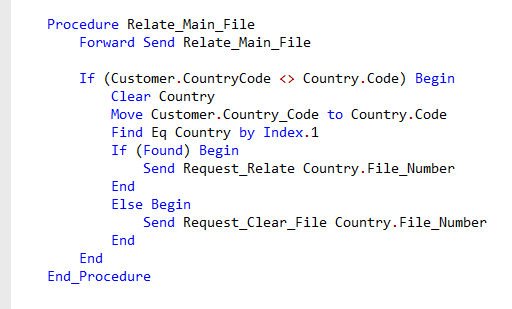
Here is the augmented Relate_Main_File event procedure in the Data Dictionary class of Customer. Let’s assume there is no relationship defined between the Customer and Country tables. The event procedure first does a Forward Send to do the regular logic. Then there is a check to see whether the Country buffer already has the same CountryCode as the Customer. This is done to prevent doing the find too often, because this event is executed very often. Then the right CountryCode record is found, and if found, the Request_Relate procedure is called. This way, columns from the Country table will be properly displayed on the data entry objects of this DDO.
By the way, as you can see, the global buffer is used to find the record. As I mentioned in the previous lesson, event procedures such as Relate_Main_File, Attach_Main_File and OnNewCurrentRecord should always use the global buffer. Because when these events are called, the Data Dictionary has already placed the correct data in the global buffer.
The message Relate_Main_File is not used for the normal relatemechanism. And by the way, in this case I’d probably just d
