
 REFERENCE LIBRARY


 Getting to know the Data Dictionaries

In the previous lesson I told you about parent tables. This lesson is focused on child tables. Most important aspect here is the deletion of records. A deletion of a parent record, but not its child records, would leave the child records as orphans. They are no longer connected to a valid parent. Since this is generally not desired, the Data Dictionaries prevent records to become orphan records. But if you do want to allow records to become orphans, you can make the relationship optional, by setting the property ParentNullAllowed, as shown in the previous lesson.
As we have seen with parent tables, a save operation propagates up through the relationship tree to parents and grandparents. A delete operation propagates the other way, down to the child tables, as we will see in a moment.
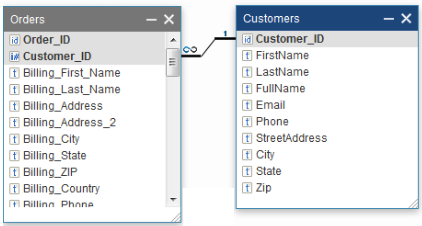
Let’s have a look at this example. Orders is a child table and it has a foreign key to the parent table Customers. So, if the foreign key column value in Orders contains a particular Customer_ID value, then there must be a row in the parent table Customers with an identical key value. Otherwise, the Order record is an orphan. So, what to do when the parent Customer record is being deleted?
Deleting child records
There are three options from which you can choose:
The first option is that you don’t want to allow a deletion of that Customer if there are still records in the Orders table with that CustomerID. Such a deletion will be cancelled and an error message will be shown.
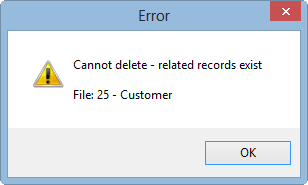
So the Customer record can only be deleted if there are no child table records with that customer.
Cascade_Delete_State
The second option, which is the default setting, is the cascade-delete. For example, when you want to delete an order, you probably want to have the order lines deleted as well. If the cascade-delete option is on, the related child records, and all descendant records, are automatically deleted together with the parent record. You can switch cascade-delete on or off by setting the Cascade_Delete_State property in the Data Dictionary:
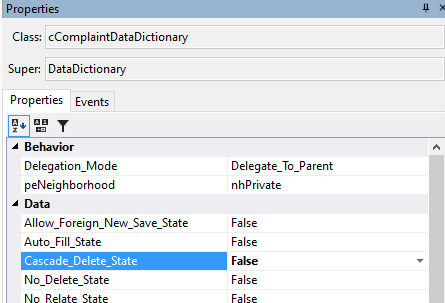

And as said, by default it is set to True. So if you want option 1, then set it to False. You can find this property in the properties panel by placing the cursor in the class code and press Ctrl and 2.
There is a third option, which I will tell you about in a moment. Let me first elaborate a bit more on the cascade-delete.
CascadeDeleteAllowed
In the Data Dictionary Modeler you might have seen the Cascade column in the “Structures” tab and might have thought that this is the cascade-delete option.
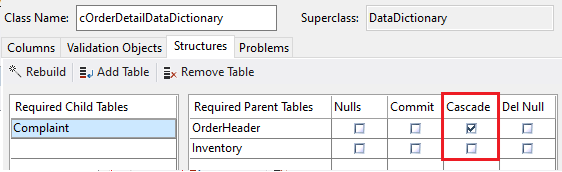
Well, yes and no. The checkboxes in the Cascade column are actually setting a different property, which is CascadeDeleteAllowed:

They are checked by default, so CascadeDeleteAllowed is True by default. And you cannot find them in the properties panel, only in the Modeler. These settings behave as an extra topping on top of the Cascade_Delete_State and only have an effect when Cascade_Delete_State is True. With these checkboxes you can specify from which parent tables a cascade-delete of the child table records should be done or not.
So in this example, when an order header record is deleted, then all Order detail records with that parent ID should be deleted, but the Order detail child records should not be deleted when an Inventory parent record is deleted. In that case the delete will be cancelled if a child record with that Inventory ID exists.
CascadeDeleteNull
OK, I promised you a third option. This again is the list of options of what to do when the parent record is being deleted. The third option is to keep the child records, but making their foreign key column empty, or zero when it is numeric.
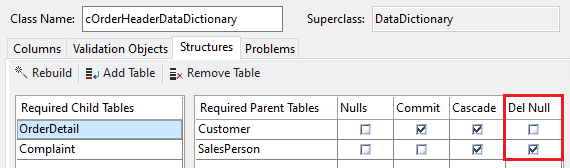
In the DD Modeler it is the last column of the Required Parent Tables list, called “Delete Null”. In this example, it is switched on for the SalesPerson parent table. The result is that, when deleting a SalesPerson record, it clears the SalesPerson column of all orders with that sales person. So instead of cascade-deleting the child order records, they are retained and no longer linked to a sales person record. This of course requires that a null parent is allowed. So, in code, you would get this:

Okay, those were the three options, and in the majority of cases you will probably use the cascade-delete option.
Validate_Cascade_Delete
Now suppose that you need to do a validation in the child records during a cascade-delete operation. You can. You can assess on a record-by-record basis whether the cascade-delete transaction should still proceed. For this, you can implement the Validate_Cascade_Delete function in the child DD class.
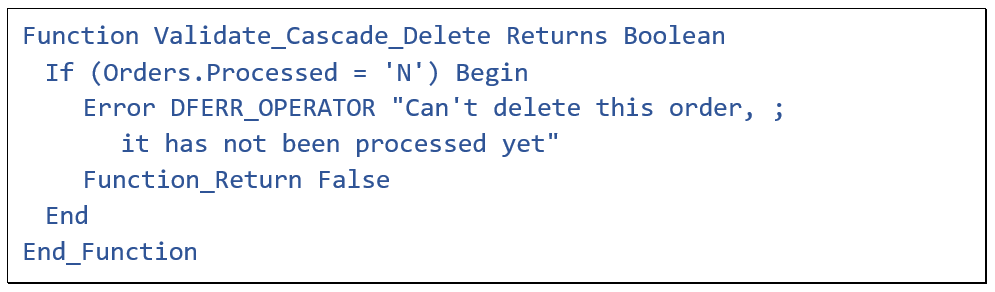
If the function returns False or raises an error, it stops the entire delete process and rolls back the whole transaction, including the deletions that have already been done.
Constrain_File
There is one more thing I like to mention in this lesson, which is the Constrain_File property. When used, this property should be set in the child, and it should be set in the Data Dictionary Object, not in the class.
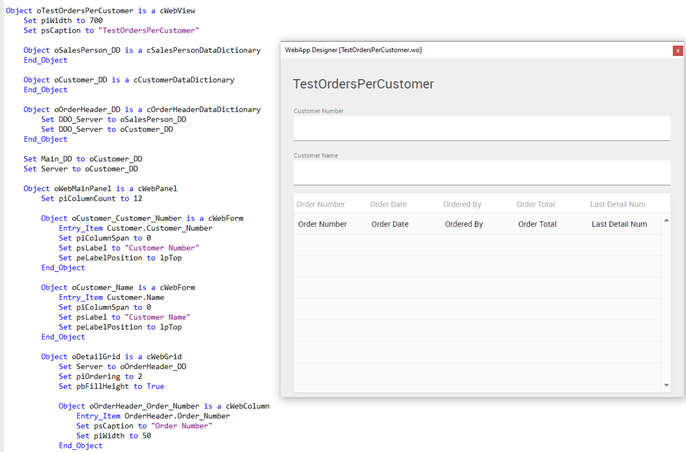
In this example, this webview should show all orders for a selected customer. Customer_DD is the main_DD. OrderHeader is a child table, related to Customer. But something is wrong here, it does not only show the orders of the selected customer; it shows all orders of all customers.
The reason is the following. While the table relation is defined, it works the other way than desired here: Suppose the application has a particular OrderHeader record in the buffer, then its parent Customer record is automatically also found. But here, it’s the other way around. It starts with the Customer record, and it is not defined that its child records are automatically found too. In fact, it will show ALL OrderHeader records. But I only want the OrderHeader records that belong to the Customer. For this, I need to set Constrain_File in the child table Data Dictionary Object to its parent.
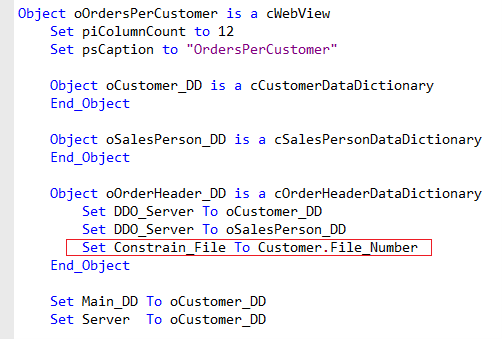
Now it will only show Orders of the selected customer.
That’s the end of this lesson. The next lesson is about global and local buffers. It is important to be aware of the differences. In case you already are, you could skip it and move on to lesson 10, which is about finding records through the Data Dictionary.
